
Arbor
Getting Started with the Arbor Parent Portal & App at Medina Primary School
At Medina Primary, we use Arbor to keep you connected with your child’s school life. Through Arbor, you can easily check attendance, book Parents' Evening appointments, and sign up for school clubs—all in one secure place.
Logging In for the First Time
To set up your account, you will need the welcome email sent directly from Medina Primary School.
-
First-Time Setup: You must log in for the first time using a desktop computer or laptop with Google Chrome as your web browser.
-
Your Username: This is the email address currently registered on our school record.
-
Verification: Click the link in your welcome email to access our school’s Parent Portal site. On your very first login, you will be prompted to enter your child’s date of birth to unlock their dashboard.
Having trouble logging in? Please contact our friendly school office team so we can verify your registered email details.
Managing Multiple Children
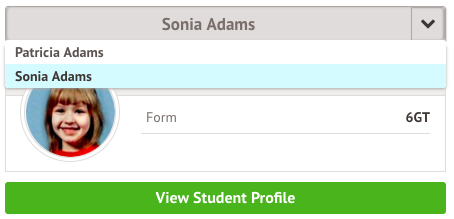
If you have more than one child attending Medina Primary, you can access all of their profiles through a single Arbor login:
-
Click on your child’s name in the drop-down menu located at the top-left of the home page.
-
Select Change Sibling to switch between your children's dashboards.
-
Note: The first time you switch to a sibling's profile, you will be asked to enter that child's date of birth.
Download the Arbor App
For easy access on the go, download the Arbor App from the Apple App Store or Google Play Store. Once you have completed your initial desktop setup, you can log into the mobile app using your same details to receive school updates on your phone or tablet.